
Printhead Care and Cleaning for Printing Businesses

Printhead Care and Cleaning for Printing Businesses
Missing lines, weak colours or interrupted jobs can quickly waste ink, media and production time. A consistent printhead maintenance routine helps reduce avoidable problems and keeps your printer ready for daily work.
This guide covers basic care for inkjet printers used in signage and textile printing, including eco-solvent, UV and DTF systems. Cleaning fluids, maintenance schedules and shutdown procedures differ between machines, so always follow the instructions for your printer and ink system.
What causes missing nozzles?
Dried ink is one possible cause, but not the only one. Dust, ink residue, air in the ink path, poor capping or damage to the printhead can also affect ink delivery. A nozzle check helps identify a problem; it does not confirm the cause by itself.
Check early, before starting a production run. This can help you avoid printing an entire job with a defect that was already visible in the test pattern.
Build a daily maintenance routine
1. Start with a nozzle check
Print the machine's nozzle test pattern before production and compare it with the normal example in your manual. Look for missing segments or misdirected lines. If the result is abnormal, follow the recommended checks and cleaning procedure before continuing the job.
Daily care habits
(1) Power routine: press "Head Moisturize" before switching off
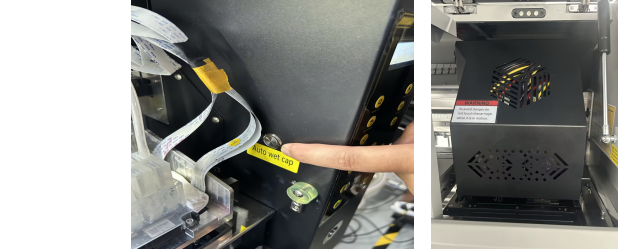
The correct shutdown has four steps:
The wrong shutdown takes one step: pulling the plug. The head stops mid-way, stays exposed, ink dries overnight, and the head is clogged by morning.
There is really only one rule here: when the machine is not in use, the printhead must be back at the ink station and properly sealed.
(2) Environment: 15–30°C and 35–65% humidity
2. Use compatible ink and cleaning supplies
Choose ink specified for your printer and printhead application. Check storage instructions and expiry dates, and avoid mixing ink types or changing formulations without technical guidance. Cleaning liquids must also match the ink system; a product suitable for one printer may be unsuitable for another.
Use the cleaning sticks or lint-free swabs specified by the manufacturer. Ordinary cotton buds can leave fibres behind. Keep cleaning tools clean and avoid returning used swabs to the cleaning-fluid container.
3. Check the maintenance station and workspace
Inspect and clean the cap, wiper and permitted areas around the printhead at the intervals stated in your manual. These parts help keep the head clean and correctly sealed. Do not rub the nozzle surface or move the carriage by force.
Keep dust under control and monitor temperature and humidity near the printer. Use the operating range specified for your machine and ink rather than a universal temperature or humidity target.
4. Finish with the correct standby procedure
Use the printer's normal shutdown or standby controls and confirm that the printhead is parked correctly. Some printers need the main power left on for automatic maintenance. Do not assume that switching off at the wall is the correct end-of-day procedure.
What to do when the nozzle check is abnormal
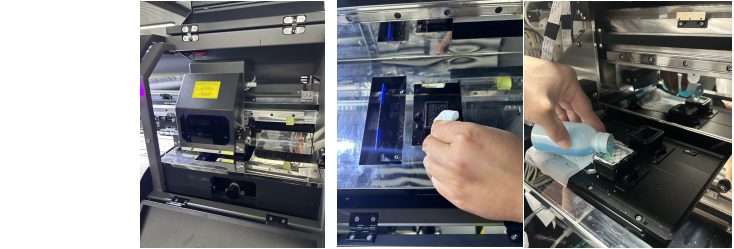
- Check the basics. Review ink levels, warnings and the condition of the maintenance station using the checks permitted in your manual.
- Run the recommended cleaning. Use the cleaning function specified for the problem, then print another nozzle check to assess the result.
- Stop if the problem persists. Follow the manual's limits and next steps. Repeated strong cleaning consumes ink and may not resolve an ink-supply or mechanical fault.
- Ask for technical diagnosis. Send your technician the printer model, ink type, nozzle-check photos and a record of the cleaning already performed.
Printhead removal, syringe flushing and soaking are not universal next steps. The correct approach depends on the head design and ink system. Leave these procedures to a qualified technician following the relevant service instructions.
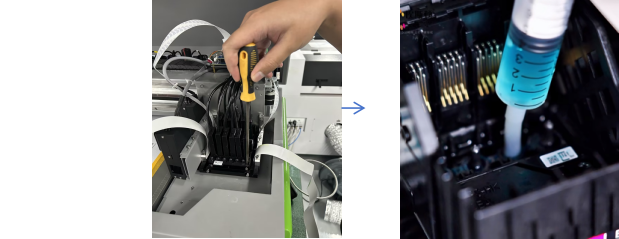
Prepare before holidays or extended downtime
Check the manufacturer's idle-storage instructions before closing your workshop. The required preparation depends on the machine, ink and length of inactivity; there is no single shutdown schedule for all printers.
- Complete the scheduled maintenance and confirm that the head is properly capped.
- Check any ink, cleaning-fluid and waste-container requirements for automatic maintenance.
- Keep the required power supply and operating conditions in place if automatic maintenance must remain active.
- For machines using white ink, follow the specified agitation or circulation routine.
- On return, complete the startup checks and inspect a nozzle test before production.
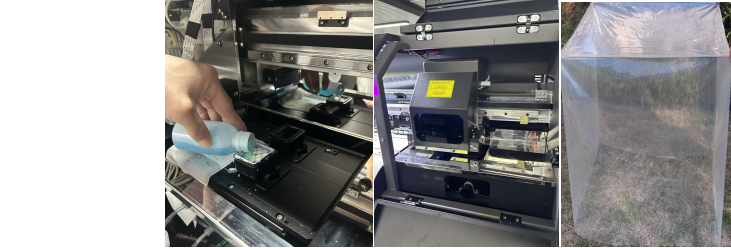
A dust cover does not replace printhead protection or automatic maintenance. Use one only as permitted by the equipment instructions.
Need help choosing maintenance supplies?
EXTREME supplies printing equipment, inks and consumables for advertising and print businesses. Contact our team with your printer model and ink type for help identifying suitable supplies. If you are experiencing missing nozzles, include a clear nozzle-check photo so we can better understand the issue.